Rain Pay · integrated payments

When it rains, it pays.

Rain Pay puts a tap and swipe terminal at every bay and station, wired straight into MonsoonOS. Payments, subscriptions, fleet washes, and promotions, all priced by your rules, all on one ledger.

Pairs with Stormbox Wash Controllers · competitive processing rates

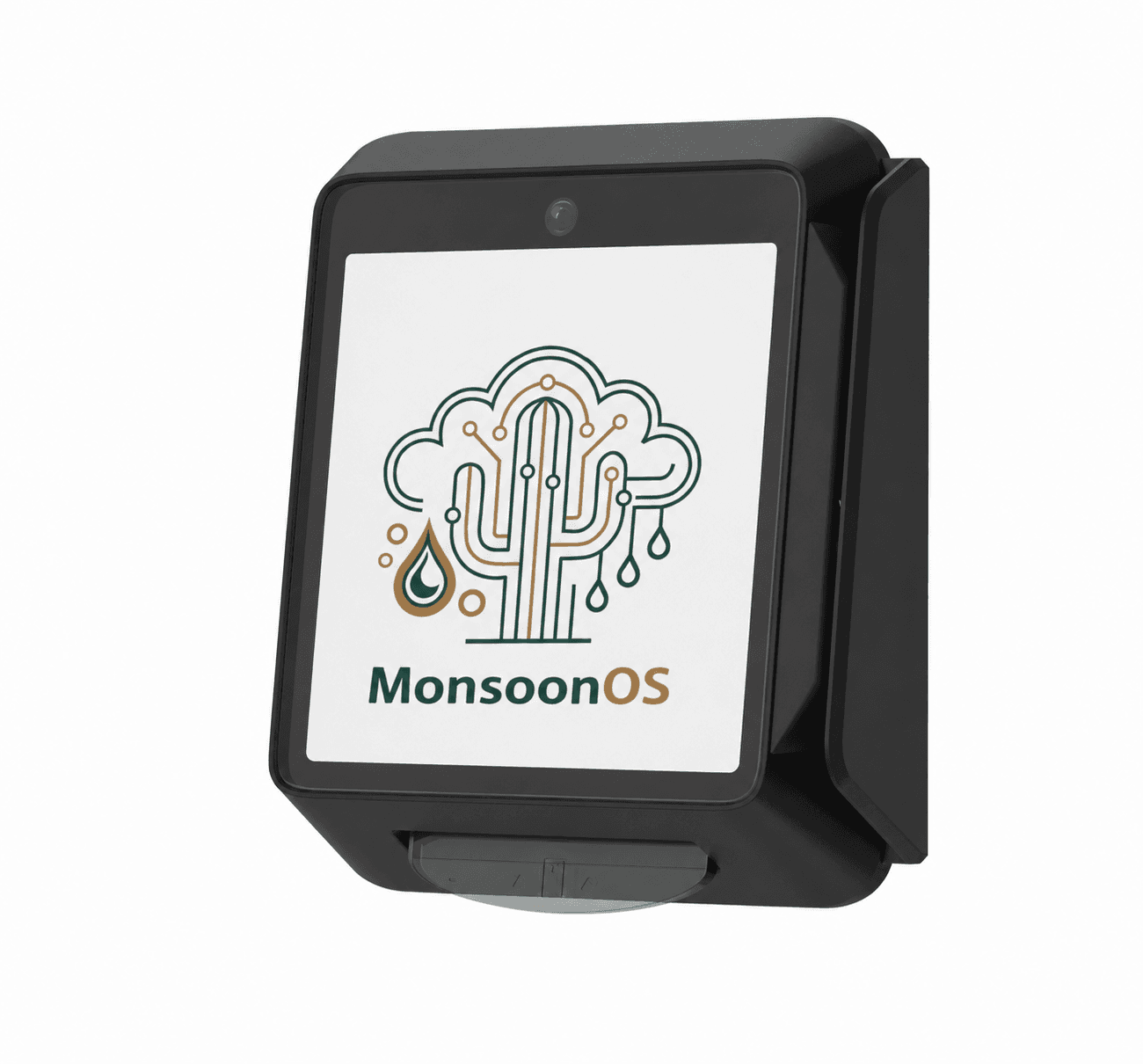
Rain Pay payment terminal, a wall-mounted tap and swipe card reader for self-service car washes and dog washes

One takes the card. One runs the wash.

A Rain Pay terminal up front, a Stormbox Wash Controller behind the wall. Together they give you control coin boxes and standalone readers never could: change a price, a wash package, or a time increment in MonsoonOS, and it’s live at every terminal instantly.

Rain Pay · at the bay

The terminal your customers see.

  • Tap or swipe any card, with no app, coins, or tokens
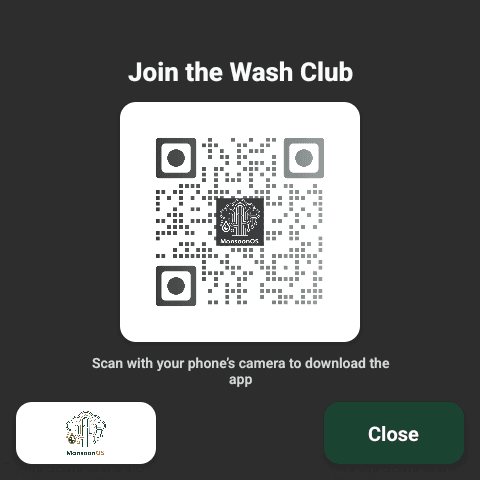
  • Sells washes and wash time on-screen, with a QR code to join a plan in the app
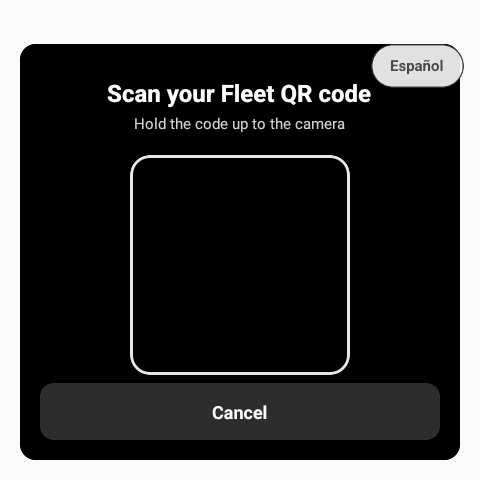
  • Scans fleet QR codes and takes the 4-digit PIN
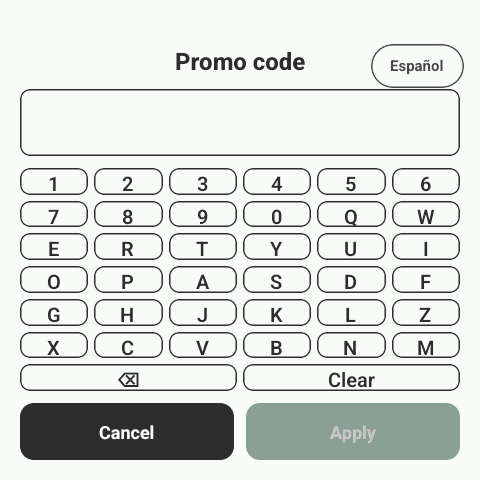
  • Redeems promo codes and wallet passes at the machine
Stormbox · behind the wall

The controller that runs the wash.

  • Connects to most wash timers, not the equipment itself
  • Runs self-serve bays, in-bay automatics, vacuums, vending, and dog wash stations
  • Takes pricing, time, and package rules straight from admin
  • Lock, unlock, or service any machine remotely

What customers see at the bay.

Every screen uses the bay names and prices you set in MonsoonOS, from the first tap to the receipt.

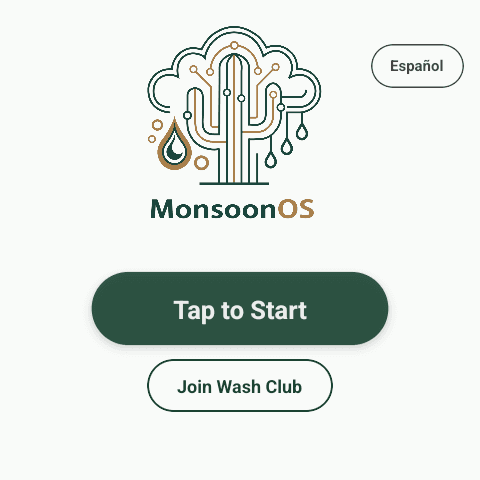
  1. Rain Pay terminal start screen with Tap to Start, Join Wash Club and Español buttons

    Tap to start

    One tap wakes the terminal. The Español button switches the screens to Spanish.

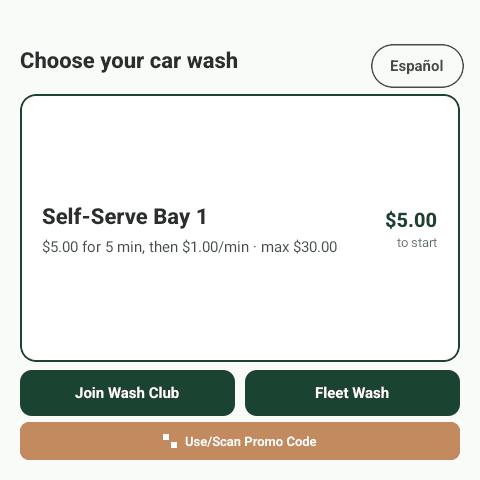
  2. Rain Pay terminal showing Self-Serve Bay 1 at $5.00 to start, with Join Wash Club, Fleet Wash and promo code buttons

    Choose the wash

    The bay, the rate and the most a wash can cost are on screen before anything is charged.

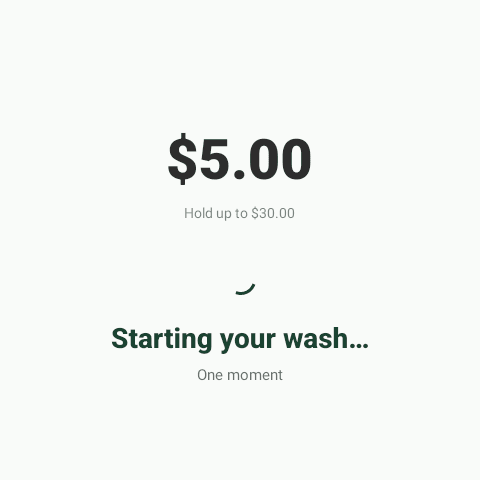
  3. Rain Pay terminal showing $5.00 with a hold up to $30.00 while the wash starts

    Wash starts

    After the card is tapped or swiped, the bay starts. The screen shows the price and the hold on the card.

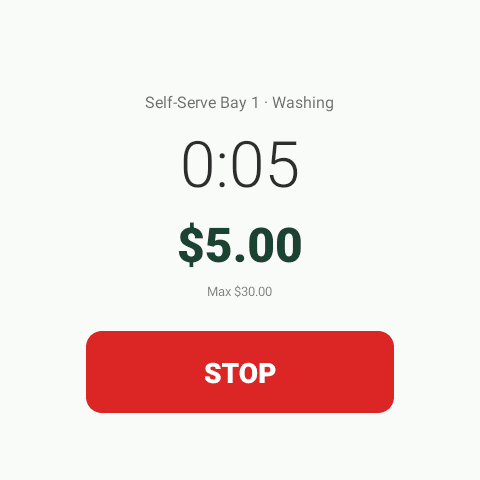
  4. Rain Pay terminal running a wash timer with the amount, the $30.00 maximum and a Stop button

    Wash on the clock

    The timer, the amount so far and the maximum stay on screen next to a Stop button.

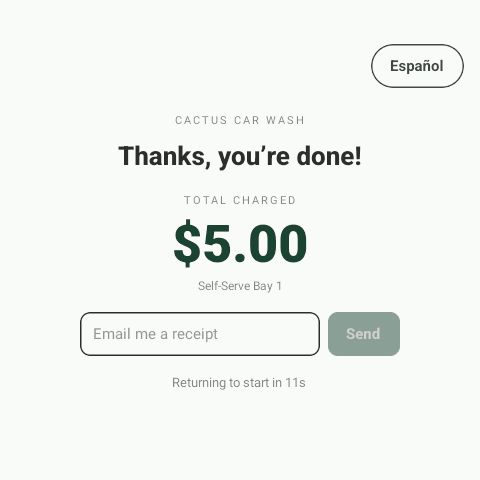
  5. Rain Pay terminal thank-you screen with the total charged and a field to email a receipt

    Total and receipt

    The total charged comes up at the end, and the customer can have a receipt emailed.

Plans, fleets and promo codes start here too.

Join Wash Club, Fleet Wash and the promo code button all sit on the Choose your wash screen.

  • Rain Pay terminal showing a Join the Wash Club QR code to download the app

    Join a plan

    A QR code on the screen takes the customer to the app to sign up.

  • Rain Pay terminal asking the driver to hold a fleet QR code up to the camera

    Fleet washes

    Drivers hold their fleet QR code up to the camera.

    Fleet billing
  • Rain Pay terminal promo code screen with an on-screen keypad

    Promo codes

    Customers type a code on the keypad or scan one.

    Promotions

Every way to pay. One terminal.

Tap or swipe

Contactless tap and swipe payments at the bay, station, or vacuum, fast enough that nobody reaches for quarters.

Competitive processing rates

Rates that hold up against the standalone readers common in self-service washes, quoted straight in a custom quote built around your wash layout.

See how pricing works

Subscriptions in the app

The terminal shows a QR code to download the app (iOS and Android), where customers start a plan billed to a saved card that renews automatically.

Fleet washes

Members scan a personalized QR code, enter a 4-digit PIN, and wash on account, with one consolidated invoice at month end.

Learn more

Promotion redemption

Coupons, free washes, and wallet passes redeem right on the terminal screen. Every redemption counted, not guessed at.

Learn more

Wash on Demand & online store

Per-wash purchases and online store orders ride the same rails, and everything reconciles on the MonsoonOS ledger automatically.

More than a card reader.

Bolting a card reader onto a coin box gets you card payments and nothing else. Rain Pay is the front door to the whole platform.

A bolted-on card reader

Takes payment. Knows nothing.

  • Takes a payment, but knows nothing about your wash
  • Separate tooling for subscriptions, or none at all
  • No fleet accounts, no consolidated billing
  • Promotions mean paper coupons and punch cards
  • Another dashboard to reconcile against your revenue
  • Price changes mean a site visit and new stickers
Rain Pay + MonsoonOS

One terminal. One ledger.

  • Tap or swipe, priced by your wash rules
  • A QR code on the terminal to join a plan in the app
  • Fleet washes with a QR code and PIN, invoiced monthly
  • Coupons, free washes, and wallet passes redeem on-screen
  • Every transaction on one ledger, tied to a customer
  • Competitive processing rates, quoted straight

From coin box to card taps.

  1. 1

    Mount Rain Pay at every bay

    A wall-mounted terminal at each bay, dog wash station, or vacuum, wherever a customer starts a wash.

  2. 2

    Pair it with Stormbox

    We pair each terminal with a Stormbox Wash Controller wired into your wash timer, so a payment starts the wash directly.

  3. 3

    Price it from MonsoonOS

    Set pricing, time increments, plans, and promotions in the admin. Changes push to every terminal instantly.

Rain Pay FAQs.

What is Rain Pay?

Rain Pay is the integrated payment terminal from Cactus Wash Systems for self-service car washes and dog washes. It takes tap and swipe card payments right at the bay, and it is wired into MonsoonOS, the same platform that runs your pricing, subscriptions, fleet accounts, and promotions.

What can customers do at a Rain Pay terminal?

Pay for washes and wash time, redeem promo codes and wallet passes, and run fleet washes with a personalized QR code and a 4-digit PIN, all on the terminal with no app required. To join a subscription, customers scan the QR code on the terminal to download the app (iOS and Android) and sign up there.

How is Rain Pay different from a standalone card reader?

A standalone reader only moves money. Rain Pay is part of the platform: pricing changes push to every terminal instantly, and every transaction lands on one ledger tied to a customer record.

What are Rain Pay's processing rates?

Competitive with the standalone card readers common in self-service washes, and the terminal comes wired into MonsoonOS instead of bolted on beside it. Exact rates come with the custom quote we build around your wash layout.

Does Rain Pay work for dog washes?

Yes. Rain Pay terminals run at self-serve bays, in-bay automatics, vacuums, and vending machines as well as dog wash stations. One payment platform across every wash type.

Do I have to replace my wash equipment to use Rain Pay?

No. Rain Pay pairs with Stormbox Wash Controllers, which connect to most wash timers in self-service car washes and dog washes. Your equipment stays; the timer gets smarter. The fastest way to confirm your setup is supported is to email Cactus Wash Systems.

Put a better terminal on the wall.

Twenty minutes with Cactus Wash Systems and you'll see how Rain Pay fits your wash. Then we build a custom quote around your layout: hardware, rates, and all.