Add a machine
Add each self-service bay, in-bay automatic, vacuum and dog wash station to a location in the MonsoonOS admin, choose its type and give it a name customers recognize.
- Plans
- Available on every MonsoonOS plan: Full Wash Platform and Rain Pay Terminals Only.
- Who can do this:
- On Full Wash, anyone whose role includes "Set up machines" (Owner by default). On Terminals Only, your admin login.
A machine is anything a customer pays to use: a self-service bay, an in-bay automatic, a vacuum or a dog wash station. Add every machine at a location first. Connecting its Stormbox, setting its price and pairing its terminal all start from the machine.
Before you start
- A name for each machine that customers will recognize, such as "Bay 4" or "Vacuum 2". Number your machines the way the signs at your site do.
Add the machine
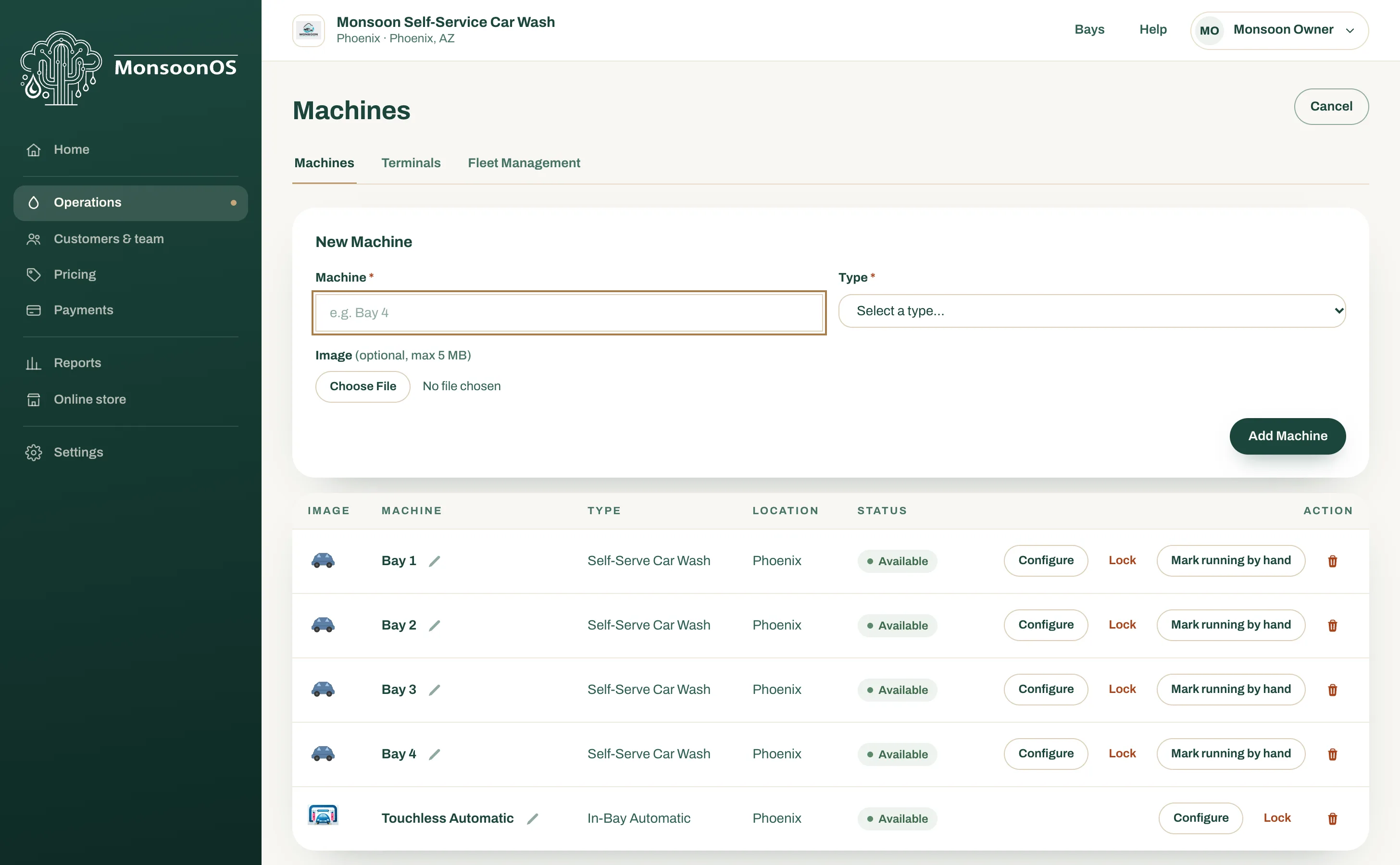
- Go to Operations › Machines. With several locations, the page lists every location; choose one from Location at the top of the page to see only its machines.
- Select + Add Machine.
- Under New Machine, type the name in Machine.
- Choose the Type. The table below explains each one.
- With several locations, choose the Location the machine is at. If the page is showing one location, the form starts with that location.
- Optionally choose an Image: JPEG, PNG, WebP, SVG or HEIC, up to 5 MB. You can add or change it later; see Add machine photos.
- Select Add Machine.
The machine appears in the list with its type, location and status.
Choose the right type
The type decides which pricing page sets the machine's price, and Rain Pay terminals price a machine by its type.
| Type | Use it for | Priced on |
|---|---|---|
| Self-Serve Car Wash | A self-service car wash bay where the customer pays for time. | Self-Service Bay Settings |
| In-Bay Automatic | An automatic wash where the car stays still and the equipment moves. Customers pick a wash from a menu. | IBA Tiers |
| Vacuum | A vacuum station. | Vacuum Settings |
| Dog Wash | A dog wash station. | Dog wash pricing |
A dog wash business uses Dog Wash for its bays, and MonsoonOS calls them Dog Wash Bays. A car wash can add a Dog Wash station too; it gets its own pricing page.
Your list can also show Token Machine, and Vending when Dryline VMS vending is part of your account. Those are set up differently from wash machines, so talk to your MonsoonOS team before you add one.
Rename a machine or change its type
- On the machine's row, select the pencil next to its name.
- Change the name in Machine, or choose a new Type.
- Select Save.
Saved shows next to the name. A machine with no type shows Set type in the Type column. Select it and choose one, because a terminal cannot price a machine without a type.
Delete a machine
- On the machine's row, select the trash can.
- Select Confirm.
You cannot delete a machine while a session is running on it. To take a machine out of use for a while, lock it instead; see Lock, unlock and force-stop a machine.
Next
Bring a Stormbox online, then set the price for each kind of machine.