Your Wallet: membership, card, credits and history
What customers find in the Wallet tab of the MonsoonOS app, their membership, saved card, rewards and credits, and billing history, and how to manage each one.
- Plans
- Available on the Full Wash Platform only. Rain Pay Terminals Only does not include it.
- Audience
- Describes what your customers see, so you can answer their questions.
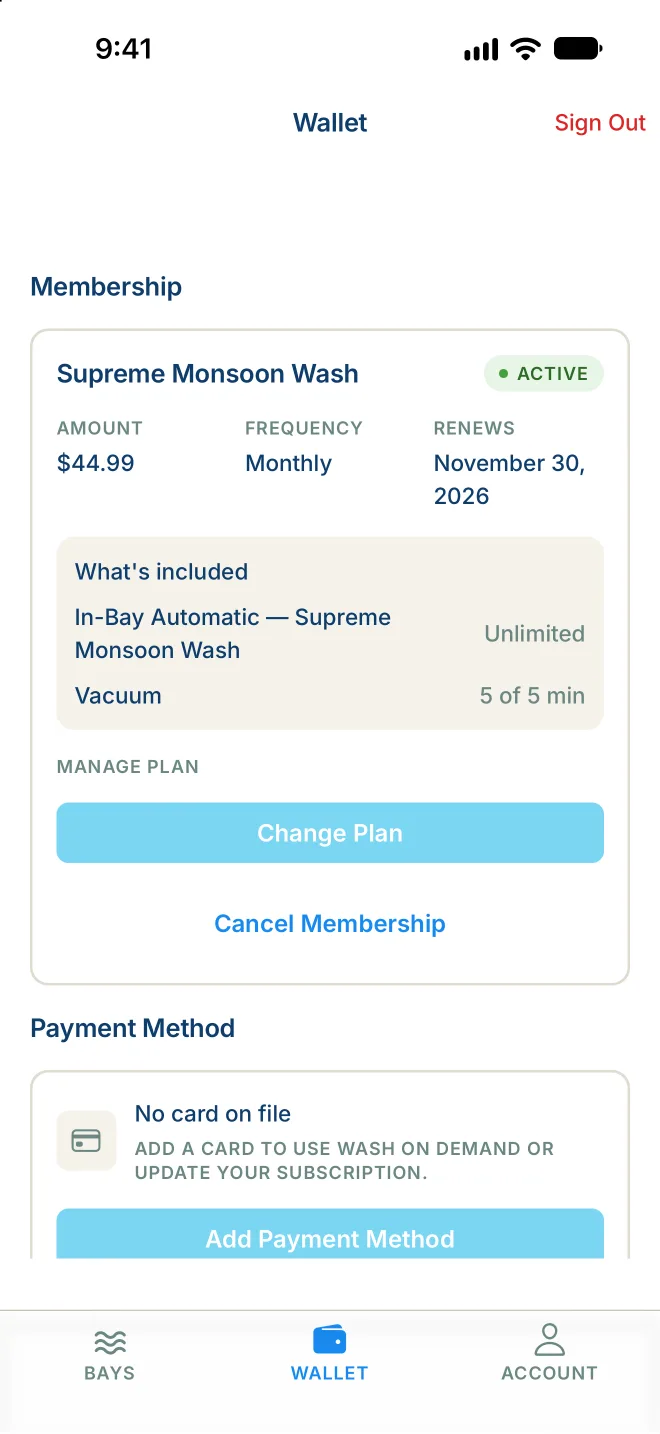
The Wallet tab holds everything about paying at your wash. It has four parts, from top to bottom: Membership, Payment Method, Rewards and Credits and Billing History. Pull down on the screen to refresh it.
If your account belongs to a company fleet, you see a Fleet tab (Pack at a dog wash) instead of Wallet.
Membership
As a Wash Club member, you see your plan name and status, with:
- Amount, Frequency and Renews: what you pay, how often, and your next billing date.
- What's included: what your plan covers and how much is left this period, for example "3 of 4 remaining this period."
Under Manage plan:
- Change Plan switches you to another plan from your next billing date. See Wash Club and Wash On Demand.
- Cancel Membership asks you to choose:
- Switch to Pay Per Wash: your plan stays until the end of the period you paid for, then the card on file pays for each wash.
- Cancel completely: your plan stays until the end of the period you paid for, and you are not charged again.
- Keep: changes nothing.
After you cancel, the Wallet shows the date your access ends and a Resume Membership button, in case you change your mind.
If your last payment failed, canceling ends the membership that day and clears the missed payments, so you are not charged for them.
On Wash On Demand, the section shows Wash on Demand and Active, with a Join Wash Club button. With no plan at all, it shows No active membership and Choose a Plan.
Payment Method
Shows the card on file, such as "Visa •••• 4242" and when it expires.
To change it, tap Update Payment Method (or Add Payment Method if you have none) and enter the new card in the secure payment form. The app shows Payment Updated when it is saved. The new card is used for your membership and for Wash On Demand washes.
Rewards and Credits
Free washes and credits from your wash appear here:
- Free washes, such as "2 free washes", marked Available at start. Wash Club members are asked whether to use one when they start a bay. On Wash On Demand, the next wash uses it.
- Account credit, such as "$5.00 account credit", marked Applies automatically. It comes off washes you pay for in the app.
- Promo codes you have added, with what they take off.
Each one shows when it expires, or No expiry. Got a code from your wash? Type it in the Have a code? box and tap Apply.
If nothing is here yet, the section says "No rewards yet. Codes from your operator will land here."
Billing History
Lists your membership bills (Subscription) and pay-per-wash charges (Wash on Demand), newest first, with the date and amount. Tap one to open its receipt. Tap Load more to see older charges.